2D에서 애니메이션은 프레임마다 그림을 새로 그려 재생했을 때 움직이는 것처럼 보이게 만든다. 하지만 3D에서도 그런 방식을 채용하기에는 무리가 있다. 왜냐하면 수많은 정점들을 가지고 있는 Mesh들이 있는데 그것의 정점들을 하나하나 다 바꿔야 한다면 말도 안되게 데이터가 늘어날 것이다. 그래서 Skinning이라는 것을 이용한다.
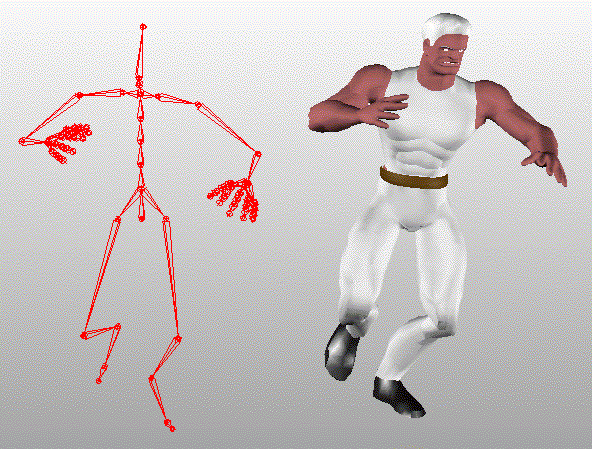
Skinning은 뼈대를 만들어 피부(정점)가 뼈에 붙어 뼈와 같이 움직인다. 뼈들은 계층 구조를 이루고 부모 뼈가 움직이면 자식 뼈도 움직인다. 즉 자식 뼈 기준에서 좌표가 변하지 않아도 부모 뼈 기준에서 좌표가 변할 수 있으므로 뼈마다 자신의 좌표계를 가지고 있다고 볼 수 있다.
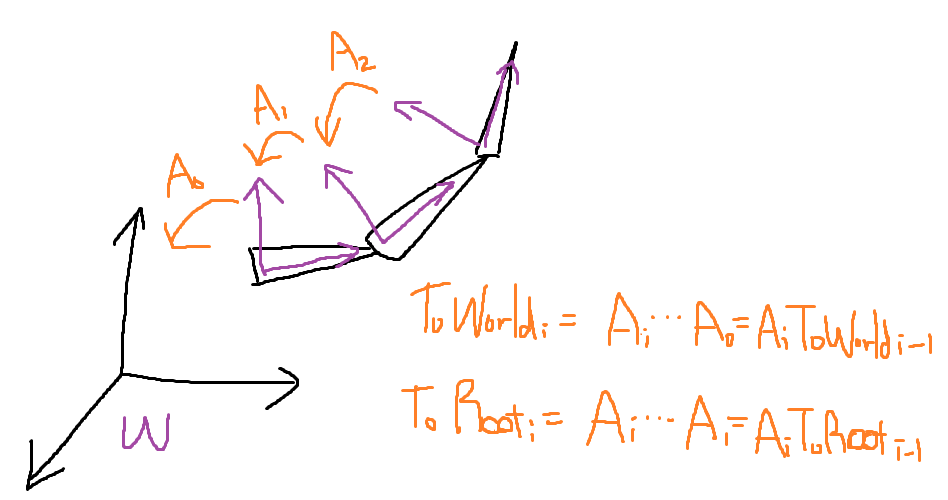
자식뼈의 local 좌표계에서 부모뼈의 local좌표계로 올라가다보면 가장 최상위 부모의 local 좌표계에서 올라가면 world 좌표로 바꿀 수 있다. 그래서 자식 뼈에서 부모 뼈 좌표로 가는 행렬을 A라고 할 때 그림과 같은 식으로 표현할 수 있다. 그리고 재귀적으로도 표현할 수 있다. 그래서 초기 바인드 포지션 기준 좌표를 로컬 본 기준으로 변환해야 하는데 이것을 오프셋 변환이라고 한다. 최상위 뼈까지 도착하면 원래 사용하던 Local -> World로 변환하면 된다.
아까 피부(정점)가 뼈에 붙어있다고 했는데 이들이 일대일 대응관계는 아니다. 예를 들어 어깨를 움직이면 가슴 쪽 근육도 살짝 움직일 것이므로 한 정점이 여러 뼈의 영향을 받을 수 있다. 그래서 가중치를 두어 계산한다. 그래서 영향을 받는 정점 별로 비율을 설정해 어떻게 움직이는지 정해준다. 최종적으로는 Offset 행렬과 ToRoot 행렬을 곱한 Final 행렬을 구한다.
그래서 뼈마다 , 프레임마다 Final 행렬을 계산한다.
void FBXLoader::LoadBones(FbxNode* node, int32 idx, int32 parentIdx)
{
	FbxNodeAttribute* attribute = node->GetNodeAttribute();

	if (attribute && attribute->GetAttributeType() == FbxNodeAttribute::eSkeleton)
	{
		shared_ptr<FbxBoneInfo> bone = make_shared<FbxBoneInfo>();
		bone->boneName = s2ws(node->GetName());
		bone->parentIndex = parentIdx;
		_bones.push_back(bone);
	}

	const int32 childCount = node->GetChildCount();
	for (int32 i = 0; i < childCount; i++)
		LoadBones(node->GetChild(i), static_cast<int32>(_bones.size()), idx);
}
코드에서는 먼저 FBXLoader에서 Mesh를 불러올 때 LoadBones로 Root Bone부터 자식을 찾아가며 모든 Bone을 추가한다. 그리고 LoadAnimationInfo로 애니메이션에 대한 기본적인 정보를 불러온다.
struct BoneWeight
{
	using Pair = pair<int32, double>;
	vector<Pair> boneWeights;
    ...
struct FbxAnimClipInfo
{
wstring name;
FbxTime startTime;
FbxTime endTime;
FbxTime::EMode mode;
vector<vector<FbxKeyFrameInfo>> keyFrames;
};
다음은 본격적인 애니메이션 정보를 Load 하기 위해 LoadAnimationData를 실행한다. 여기서는 LoadBoneWeight로 아까 말한 가중치를 저장한다. BoneWeight는 pair을 가진 구조체로 pair은 이 뼈에 영향을 주는 정점들과 가중치 비율을 가지고 있다. 그리고 AnimClipInfo에서는 startTime, endTime, keyFrames를 가지고 있는데 이것도 아까 말한 뼈별로 프레임마다
가지고 있는 정보를 2차원 벡터로 가지고 있다. LoadKeyFrames에서 키프레임들을 채운다.
shared_ptr<StructuredBuffer>	_offsetBuffer; // 각 뼈의 offset 행렬
vector<shared_ptr<StructuredBuffer>> _frameBuffer; // 전체 본 프레임 정보
프레임 계산을 GPU에서 해서 빠르게 처리하기 위해 StructuredBuffer로 만들어준다.
//animation.fx
StructuredBuffer<AnimFrameParams>   g_bone_frame : register(t8);
StructuredBuffer<matrix>            g_offset : register(t9);
RWStructuredBuffer<matrix>          g_final : register(u0);

// ComputeAnimation
// g_int_0 : BoneCount
// g_int_1 : CurrentFrame
// g_int_2 : NextFrame
// g_float_0 : Ratio
[numthreads(256, 1, 1)]
void CS_Main(int3 threadIdx : SV_DispatchThreadID)
{
    if (g_int_0 <= threadIdx.x)
        return;

    int boneCount = g_int_0;
    int currentFrame = g_int_1;
    int nextFrame = g_int_2;
    float ratio = g_float_0;

    uint idx = (boneCount * currentFrame) + threadIdx.x;
    uint nextIdx = (boneCount * nextFrame) + threadIdx.x;

    float4 quaternionZero = float4(0.f, 0.f, 0.f, 1.f);

    float4 scale = lerp(g_bone_frame[idx].scale, g_bone_frame[nextIdx].scale, ratio);
    float4 rotation = QuaternionSlerp(g_bone_frame[idx].rotation, g_bone_frame[nextIdx].rotation, ratio);
    float4 translation = lerp(g_bone_frame[idx].translation, g_bone_frame[nextIdx].translation, ratio);

    matrix matBone = MatrixAffineTransformation(scale, quaternionZero, rotation, translation);

    g_final[threadIdx.x] = mul(g_offset[threadIdx.x], matBone);
}
animation.fx에서는 frame에서 정보를 받아와서 프레임과 다음 프레임 사이를 보간한다. CS에서 g_bone_frame과 g_offset을 이용해 보간한 값을 최종적으로 g_final에 저장한다.
void Animator::PushData()
{
	uint32 boneCount = static_cast<uint32>(_bones->size());
	if (_boneFinalMatrix->GetElementCount() < boneCount)
		_boneFinalMatrix->Init(sizeof(Matrix), boneCount);

	// Compute Shader
	shared_ptr<Mesh> mesh = GetGameObject()->GetMeshRenderer()->GetMesh();
	mesh->GetBoneFrameDataBuffer(_clipIndex)->PushComputeSRVData(SRV_REGISTER::t8);
	mesh->GetBoneOffsetBuffer()->PushComputeSRVData(SRV_REGISTER::t9);

	_boneFinalMatrix->PushComputeUAVData(UAV_REGISTER::u0);

	_computeMaterial->SetInt(0, boneCount);
	_computeMaterial->SetInt(1, _frame);
	_computeMaterial->SetInt(2, _nextFrame);
	_computeMaterial->SetFloat(0, _frameRatio);

	uint32 groupCount = (boneCount / 256) + 1;
	_computeMaterial->Dispatch(groupCount, 1, 1);

	// Graphics Shader
	_boneFinalMatrix->PushGraphicsData(SRV_REGISTER::t7);
}
Animator::PushData에서 u0레지스터에 Compute Shader로 계산한 값을 넣어주고 Dispatch로 계산을 해서 t7 레지스터에
deferrend Rendering 계산을 완료한 결과값이 저장된다.
  if (g_int_0 == 1)
    {
        if (g_int_1 == 1)
            Skinning(input.pos, input.normal, input.tangent, input.weight, input.indices);

        output.pos = mul(float4(input.pos, 1.f), input.matWVP);
        output.uv = input.uv;

        output.viewPos = mul(float4(input.pos, 1.f), input.matWV).xyz;
        output.viewNormal = normalize(mul(float4(input.normal, 0.f), input.matWV).xyz);
        output.viewTangent = normalize(mul(float4(input.tangent, 0.f), input.matWV).xyz);
        output.viewBinormal = normalize(cross(output.viewTangent, output.viewNormal));
    }
void Skinning(inout float3 pos, inout float3 normal, inout float3 tangent,
inout float4 weight, inout float4 indices)
{
SkinningInfo info = (SkinningInfo)0.f;
for (int i = 0; i < 4; ++i)
{
if (weight[i] == 0.f)
continue;
int boneIdx = indices[i];
matrix matBone = g_mat_bone[boneIdx];
info.pos += (mul(float4(pos, 1.f), matBone) * weight[i]).xyz;
info.normal += (mul(float4(normal, 0.f), matBone) * weight[i]).xyz;
info.tangent += (mul(float4(tangent, 0.f), matBone) * weight[i]).xyz;
}
pos = info.pos;
tangent = normalize(info.tangent);StructuredBuffer<Matrix> g_mat_bone : register(t7);
계산한 것들을 deferred rendering 하는데 g_int_1이 켜져있을 경우 Skinning으로 인식한다. weight를 보고 가중치에 따라 pos, normal, tangent를 세팅한다. 그래서 결과 값이 Root의 local 좌표계이므로 matWVP를 곱해 기존과 같이 계산한다.
g_matBone에 저장되는데 params.fx에 새로 추가된 StructuredBuffer이다.
'그래픽스' 카테고리의 다른 글
| [그래픽스] 선과 구의 충돌 (0) | 2023.05.11 |
|---|---|
| [그래픽스] Kernel, Convolution, Gaussian Blur (0) | 2023.05.10 |
| [DX12] Picking (0) | 2022.07.31 |
| [DX12] Terrain (0) | 2022.07.31 |
| [DX12] Tessellation (0) | 2022.07.31 |


