Terrain은 Tessellation을 이용할 수 있는 대표적인 예시이다. Terrain은 배열처럼 무수히 많은 삼각형들의 모임이다.
Terrain을 저장하는 법은 정점 전부를 저장하는 것보다 높이 값을 저장하는 방법을 이용한다. Terrain은 x축, y축 규격이
일정한 배열처럼 되어있기 때문이다. 그래서 높이 맵을 이용하는데 정점마다 높이 값을 Texture에 저장한다.
shared_ptr<Mesh> Resources::LoadTerrainMesh(int32 sizeX, int32 sizeZ)
{
	vector<Vertex> vec;

	for (int32 z = 0; z < sizeZ + 1; z++)
	{
		for (int32 x = 0; x < sizeX + 1; x++)
		{
			Vertex vtx;
			vtx.pos = Vec3(static_cast<float>(x), 0, static_cast<float>(z));
			vtx.uv = Vec2(static_cast<float>(x), static_cast<float>(sizeZ - z));
			vtx.normal = Vec3(0.f, 1.f, 0.f);
			vtx.tangent = Vec3(1.f, 0.f, 0.f);

			vec.push_back(vtx);
		}
	}
    vector<uint32> idx;

	for (int32 z = 0; z < sizeZ; z++)
	{
		for (int32 x = 0; x < sizeX; x++)
		{
			//  [0]
			//   |	\
			//  [2] - [1]
			idx.push_back((sizeX + 1) * (z + 1) + (x));
			idx.push_back((sizeX + 1) * (z)+(x + 1));
			idx.push_back((sizeX + 1) * (z)+(x));
			//  [1] - [2]
			//   	\  |
			//		  [0]
			idx.push_back((sizeX + 1) * (z)+(x + 1));
			idx.push_back((sizeX + 1) * (z + 1) + (x));
			idx.push_back((sizeX + 1) * (z + 1) + (x + 1));
		}
	}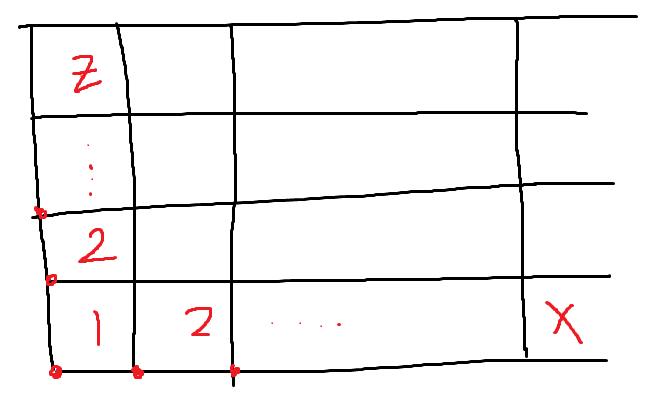
TerrainMesh를 만들때는 SizeX, SizeZ일 때 정점의 개수는 그보다 한개씩 더 많으므로 이중 루프를 돌려 모든 정점들에 대한 계산을 한다. 그리고 정점 4개가 삼각형 두개로 이루어지도록 Index를 설정한다.
// Constant HS
PatchTess ConstantHS(InputPatch<VS_OUT, 3> input, int patchID : SV_PrimitiveID)
{
    PatchTess output = (PatchTess)0.f;

    float minDistance = g_vec2_1.x;
    float maxDistance = g_vec2_1.y;

    float3 edge0Pos = (input[1].pos + input[2].pos) / 2.f;
    float3 edge1Pos = (input[2].pos + input[0].pos) / 2.f;
    float3 edge2Pos = (input[0].pos + input[1].pos) / 2.f;

    edge0Pos = mul(float4(edge0Pos, 1.f), g_matWorld).xyz;
    edge1Pos = mul(float4(edge1Pos, 1.f), g_matWorld).xyz;
    edge2Pos = mul(float4(edge2Pos, 1.f), g_matWorld).xyz;

    float edge0TessLevel = CalculateTessLevel(g_vec4_0.xyz, edge0Pos, minDistance, maxDistance, 4.f);
    float edge1TessLevel = CalculateTessLevel(g_vec4_0.xyz, edge1Pos, minDistance, maxDistance, 4.f);
    float edge2TessLevel = CalculateTessLevel(g_vec4_0.xyz, edge2Pos, minDistance, maxDistance, 4.f);

    output.edgeTess[0] = edge0TessLevel;
    output.edgeTess[1] = edge1TessLevel;
    output.edgeTess[2] = edge2TessLevel;
    output.insideTess = edge2TessLevel;

    return output;
}
TerrainMesh를 만들고 나서 거리에 따라 Tessellation Level을 조절하도록 새로운 Terrain.hlsl을 만든다. min/max distance는 minDistance일 때 Tessellation을 최대로 해주고 (쪼개서 자세하게 표현) maxDistance일 때 최소로 한다.
float CalculateTessLevel(float3 cameraWorldPos, float3 patchPos, float min, float max, float maxLv)
{
    float distance = length(patchPos - cameraWorldPos);

    if (distance < min)
        return maxLv;
    if (distance > max)
        return 1.f;

    float ratio = (distance - min) / (max - min);
    float level = (maxLv - 1.f) * (1.f - ratio);
    return level;
}
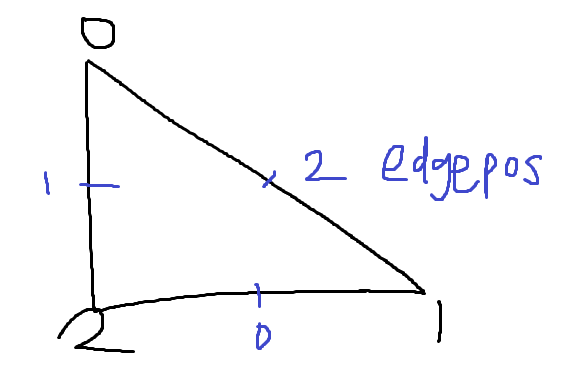
edgePos는 index와 반대 순서의 변의 중점이다. edgePos들을 world좌표계로 변환하고 CalculateTessLevel에서 patch의 위치와 카메라와 거리를 비교해 Tesselation Level을 계산한다. 최소로 가까울 경우 Tesselation 최대, 제일 멀 경우 최소.
// [Terrain Shader]
// g_int_1      : TileX
// g_int_2      : TileZ
// g_float_0    : Max Tessellation Level
// g_vec2_0     : HeightMap Resolution
// g_vec2_1     : Min/Max Tessellation Distance
// g_vec4_0     : Camera Position
// g_tex_0      : Diffuse Texture
// g_tex_1      : Normal Texture
// g_tex_2      : HeightMap Texture

// --------------
// Domain Shader
// --------------

struct DS_OUT
{
    float4 pos : SV_Position;
    float2 uv : TEXCOORD;
    float3 viewPos : POSITION;
    float3 viewNormal : NORMAL;
    float3 viewTangent : TANGENT;
    float3 viewBinormal : BINORMAL;
};domain("tri")]

DS_OUT DS_Main(const OutputPatch<HS_OUT, 3> input, float3 location : SV_DomainLocation, PatchTess patch)
{
    DS_OUT output = (DS_OUT)0.f;

    float3 localPos = input[0].pos * location[0] + input[1].pos * location[1] + input[2].pos * location[2];
    float2 uv = input[0].uv * location[0] + input[1].uv * location[1] + input[2].uv * location[2];

    int tileCountX = g_int_1;
    int tileCountZ = g_int_2;
    int mapWidth = g_vec2_0.x;
    int mapHeight = g_vec2_0.y;

    float2 fullUV = float2(uv.x / (float)tileCountX, uv.y / (float)tileCountZ);
    float height = g_tex_2.SampleLevel(g_sam_0, fullUV, 0).x;

    // 높이맵 높이 적용
    localPos.y = height;
Domain Shader에서는 지금 uv 값이 타일마다 1씩 늘어나는데 전체가 0~1인 uv좌표로 만들기 위해 tileCount로 나눠 fullUV 값을 구한다. height은 SampleLevel을 쓰는데 PS에서 Sample와 같은 것으로 PS이외에서 사용할 때는 SampleLevel을 사용해야 한다. 그래서 g_tex_2에 방금 구한 uv좌표에 해당하는 x값을 height으로 정한다. height은 localPos.y에 적용해 높이맵 높이를 적용한다.
    float2 deltaUV = float2(1.f / mapWidth, 1.f / mapHeight);
    float2 deltaPos = float2(tileCountX * deltaUV.x, tileCountZ * deltaUV.y);

    float upHeight = g_tex_2.SampleLevel(g_sam_0, float2(fullUV.x, fullUV.y - deltaUV.y), 0).x;
    float downHeight = g_tex_2.SampleLevel(g_sam_0, float2(fullUV.x, fullUV.y + deltaUV.y), 0).x;
    float rightHeight = g_tex_2.SampleLevel(g_sam_0, float2(fullUV.x + deltaUV.x, fullUV.y), 0).x;
    float leftHeight = g_tex_2.SampleLevel(g_sam_0, float2(fullUV.x - deltaUV.x, fullUV.y), 0).x;

    float3 localTangent = float3(localPos.x + deltaPos.x, rightHeight, localPos.z) - float3(localPos.x - deltaPos.x, leftHeight, localPos.z);
    float3 localBinormal = float3(localPos.x, upHeight, localPos.z + deltaPos.y) - float3(localPos.x, downHeight, localPos.z - deltaPos.y);

    output.pos = mul(float4(localPos, 1.f), g_matWVP);
    output.viewPos = mul(float4(localPos, 1.f), g_matWV).xyz;

    output.viewTangent = normalize(mul(float4(localTangent, 0.f), g_matWV)).xyz;
    output.viewBinormal = normalize(mul(float4(localBinormal, 0.f), g_matWV)).xyz;
    output.viewNormal = normalize(cross(output.viewBinormal, output.viewTangent));

    output.uv = uv;

    return output;
}
그 다음에는 높이가 계속 바뀌니까 기존의 tangent 와 binormal을 update해준다. 현재 좌표 주변 점들로 tangent, binormal을 구하고 둘의 결과물로 외적해서 normal도 구할 수 있다. 그리고 PS에서는 Deferred Rendering을 통한 계산을 한다.
'그래픽스' 카테고리의 다른 글
| [DX12] Animation (0) | 2022.08.01 |
|---|---|
| [DX12] Picking (0) | 2022.07.31 |
| [DX12] Tessellation (0) | 2022.07.31 |
| [DX12] Shadow Mapping (0) | 2022.07.30 |
| [DX12] Instancing (0) | 2022.07.30 |


